
Online rooms · up to four players
PokéSurvivor Co-op
PokéSurvivor online co-op lets a host and up to three friends share a survival run. Each player controls their own partner, attacks and health; the host coordinates enemies, pickups, the run clock and team experience. Start on the official online game, sign in, add friends by their public nickname and gather in one room before launching. More players bring more enemies, so plan your movement and rescues as a team.
From a friend request to a shared run
Use an online account on the official site. Guests can try solo play, but the friend-list workflow needs an account and a public nickname. The author's downloadable itch.io edition is solo-only; use the online edition for multiplayer and cloud saving.
Sign in and choose your public nickname: Use your game account, then choose the nickname your friends will search for. Exchange that nickname with your group: friend requests look up the public player name, so an account login or a Pokémon's name is not a substitute.
Add and accept friends: Search for your friend's exact nickname and send a friend request. The recipient accepts it before you use the room-invitation flow. A pending request and an accepted friendship are different states; check the friends list before retrying an invitation.
Choose one host and create a room: Have that player create the room. The creator becomes the host. Keep the host's game tab active during the run because it runs the shared enemy simulation and clock. Everyone else should join that room rather than create a separate one.
Invite up to three friends: Send invitations from the room and have your friends accept them. The four-player limit includes the host. Check the room's member list to confirm that the intended players have arrived; sending an invitation alone does not put a player in the room.
Choose partners and agree that everyone is ready: Check the selected partners in the lobby and discuss your intended attack coverage. Changing a partner updates the room entry. Finish these choices before the host starts: once the run begins, the room closes to new arrivals.
Start together and keep track of teammates: The host starts the shared run. Move with enough room to avoid the horde while keeping an escape path toward fallen teammates. When the team levels up, make your card choice so everyone can resume; each player still chooses their own build.
How difficulty changes with the group size
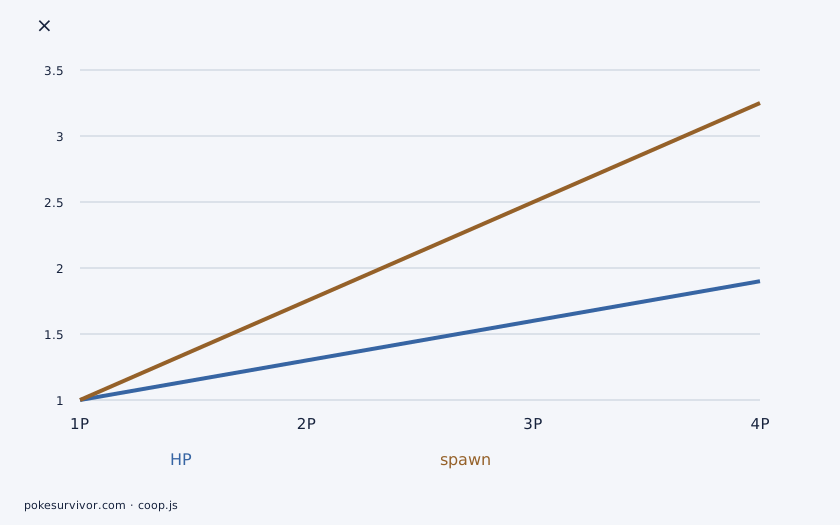
For N players, ordinary enemy HP is multiplied by 1 + 0.3 × (N − 1), while spawn rate is multiplied by 1 + 0.75 × (N − 1). Four players therefore face ordinary enemies with 1.9 times solo HP and a 3.25 times spawn rate. A larger room does not simply divide the same solo wave among more attackers.
Rift legendaries use the co-op HP multiplier and an additional ×1.4 whenever more than one player is present. For four players that produces ×2.66 relative to a solo rift at the same run time. Treat the ordinary-enemy figure and the legendary figure separately when deciding whether your group is ready for a portal.
| Players | Ordinary enemy HP | Enemy spawn rate | Rift legendary HP |
|---|---|---|---|
| 1 | ×1 | ×1 | ×1 |
| 2 | ×1.3 | ×1.75 | ×1.82 |
| 3 | ×1.6 | ×2.5 | ×2.24 |
| 4 | ×1.9 | ×3.25 | ×2.66 |
HP and spawn rate are separate multipliers. These values describe enemy pressure, not team damage, rewards or a guaranteed clear speed. Rift HP also depends on when you enter the arena.
Shared experience, individual choices
Experience and team leveling are coordinated by the host, so collecting XP supports the shared level rather than creating four unrelated progression tracks. The game adjusts team XP for player count and the group's experience bonuses. The higher spawn rate is not a promise that a four-player group will level 3.25 times as fast.
At a team level-up, each connected player must finish their own card choice before the host resumes play. Shared level does not mean shared moves: teammates can select different attacks and upgrades for their partners. If the waiting display names a player, ask them to finish that choice before treating the pause as a connection problem.
Bond fusion choices also hold the game for the group. Before a run, review a few useful moves and their requirements so you can make these decisions without a long discussion every time. Your active move group belongs to your partner; another player's selection does not equip it for you.
Revive by staying beside a fallen teammate
A nearby teammate can revive a fallen partner in three seconds. The revived player returns with 50% of their maximum HP. This is a proximity rescue: reaching the teammate is only the first step, and immediately leaving does not complete the required time.
Plan the rescue around a safe approach and a clear retreat. Assign one player to approach while the others draw pressure away when possible. A successful revive leaves the partner partly healed, so allow them space to retreat instead of immediately pulling the group into another dense wave.
- Lead nearby enemies away from the fallen partner before approaching.
- Stand beside the teammate for the three-second revive instead of running past them.
- Once they get up, move out together; they return with half of their maximum HP.
- Rebuild a safe movement loop before chasing another pickup or entering a portal.
Choose coverage before filling all four places
Compare the moves your chosen partners can learn, rather than selecting four names solely by rarity. PokéSurvivor uses softened type matchups: super-effective attacks deal ×1.6, resisted attacks ×0.6 and main-series immunity matchups ×0.3. Dual-type contributions multiply, then the type result is clamped between ×0.3 and ×2.4.
As a practical team plan, identify who can attack the opponents your other players struggle against and who can keep moving while a rescue is underway. These are coordination roles, not fixed character classes. Check the Pokédex for actual partner stats and learnsets, then use the type guide to compare your attacks against the enemies you expect.
One player entering a rift moves the group
A rift lasts 45 seconds on the field. When a player enters, the host coordinates the transition and the whole group travels into the legendary arena. Tell teammates before touching the portal so a player preparing a rescue or repositioning is not surprised by the move.
The arena has a 120-second combat limit. A victory gives each player a Bond; timing out or having the whole group down sends you back without the victory reward. The ordinary map's enemies are restored when you return. Regroup after the transfer and check the return position before continuing your movement loop.
Room and host problems to check first
The host keeps the enemy simulation and run clock moving. Backgrounding or freezing that game tab can stall the shared run; leaving an active run as host ends it for the whole group. Choose a host who can keep the browser open for the session, and finish account, friend and partner setup before they launch.
Check whether a teammate is choosing a card or the host has left the game tab before treating a pause as a connection failure. If a room has already started, the closed-lobby state is expected. A friend joining later needs the next run rather than another invitation to the current one.
| What you see | What to check |
|---|---|
| A nickname cannot be found | Confirm the friend's exact public nickname and that they have chosen one. The social lookup searches player nicknames. |
| The friend request is still pending | Have the recipient accept it. Sending repeated requests does not create an accepted friendship. |
| The room is full or has already started | Count the host as one of the four places. Join before the host starts, or gather in a new lobby for the next run. |
| The group is waiting after a level or Bond | Check who still needs to choose a card or finish a fusion. Those decisions can pause the shared run. |
| Enemies and the clock stop together | Ask the host to return to the active game tab and check their connection. The game stalls shared play when the host is away or stops sending updates. |
| The host's room disappears | Create a new room and invite the group again. Leaving or closing the host's browser removes the room; an active co-op run ends for everyone when the host leaves. |